


Create an Account and Receive 100 USDT Demo Credits
Setting Up Your Initial Virtual Balance
Important to Know
- One email and phone per account: Each email address or mobile number can be linked to just one CoinACE account.
- Why we ask for your country: We use it to personalize your feed and find fair battle match-ups.
- Use single-byte characters only: Please type all information with standard (single-byte) letters and numbers. Don’t use double-byte characters such as 한글, Kanji, or Chinese characters.
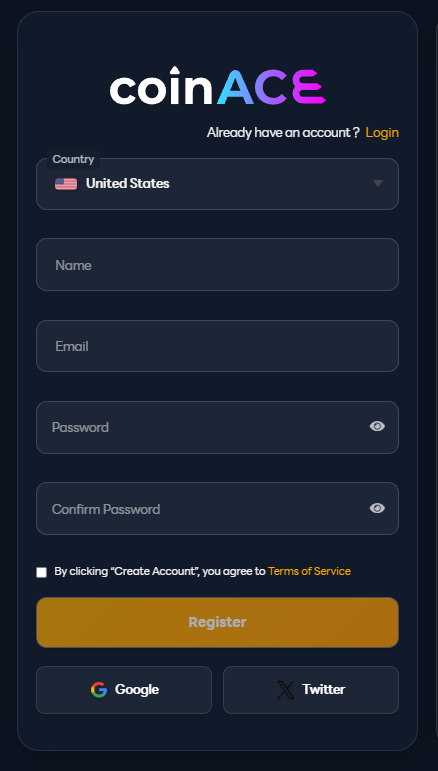
Step 1 – Create Your Account
- Visit the signup page: https://coinace.app/register
- Enter your country code, choose a secure password, and (optionally) add a referral code.
- Submit to finish registration.
Notes
- Clicking Sign up with Google uses the email address linked to your Google account.
- Clicking Sign up with X (Twitter) creates your CoinACE account with Twitter only—you won’t be able to use an email/password login later.
Step 2 – Claim Your 100,000 USDT Demo Balance
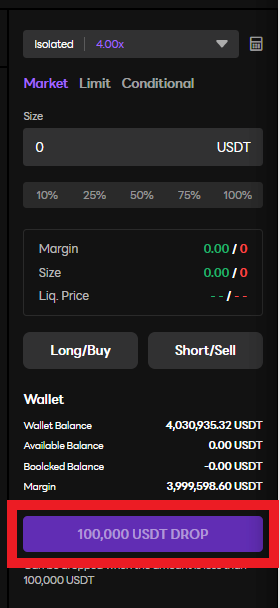
- Go to the simulation trading page: https://coinace.app/demo-futures-exchange/BTC-USDT
- Click the “100,000 USDT DROP” button to top up your demo funds.
Rules for the Drop
- You can’t claim while you have an open position.
- You can’t claim during an ongoing battle.
- You can only claim when your demo balance is below 100,000 USDT.
- You can claim the Drop once per day.
- The Drop tops you back up to exactly 100,000 USDT.
- Example: If you have 40,000 USDT, you receive 60,000 USDT.
Enjoy trading risk-free and honing your skills on CoinACE!